ADA · WCAG 2.2 · EAA 2025what is this?
Know your site is accessible before a lawyer does.
Rampa checks your site every week, explains each issue without jargon and hands you the corrected code, already tested. Your developer pastes it. You're covered.
What is this for?
Your site has to work for everyone: also for people who can't see well, can't hear, or can't use a mouse. There are laws that require it and a list of rules that says how. If you don't meet them, you can be sued or fined. These are the acronyms you'll see:
- WCAG
- The rules. A list of what a site must do so anyone can use it. Every law is based on it.
- ADA
- The US law. Since 2017 it applies to websites too. That's where the lawsuits come from.
- EAA
- The European law. In force since 2025 for anyone selling to EU customers.
- Section 508
- What the US government requires from its suppliers.
- LBI
- Brazil's law.
- axe-core
- The program that checks your site. It's free and everyone uses it, Google included.
Rampa checks your site against those rules, tells you what fails and gives you the code to fix it.
Written for the owner. Delivered to the developer.
Every finding has two parts: what it means for your customers and your legal exposure, and the exact element with the corrected code.
For you
"Text that is hard to read: people with low vision and anyone on a phone in sunlight can't read it. It's the most common finding in lawsuits."
For your developer
Selector, current HTML, corrected HTML and WCAG criterion. With a shareable link and a PDF.
Tested, not guessed
Each fix is re-tested against the rule that flagged it. If it doesn't pass, you don't see it.
For agencies: every client in one place.
Group sites by client, send each one a monthly summary under your brand, and hand them a public accessibility statement they can link from their footer.
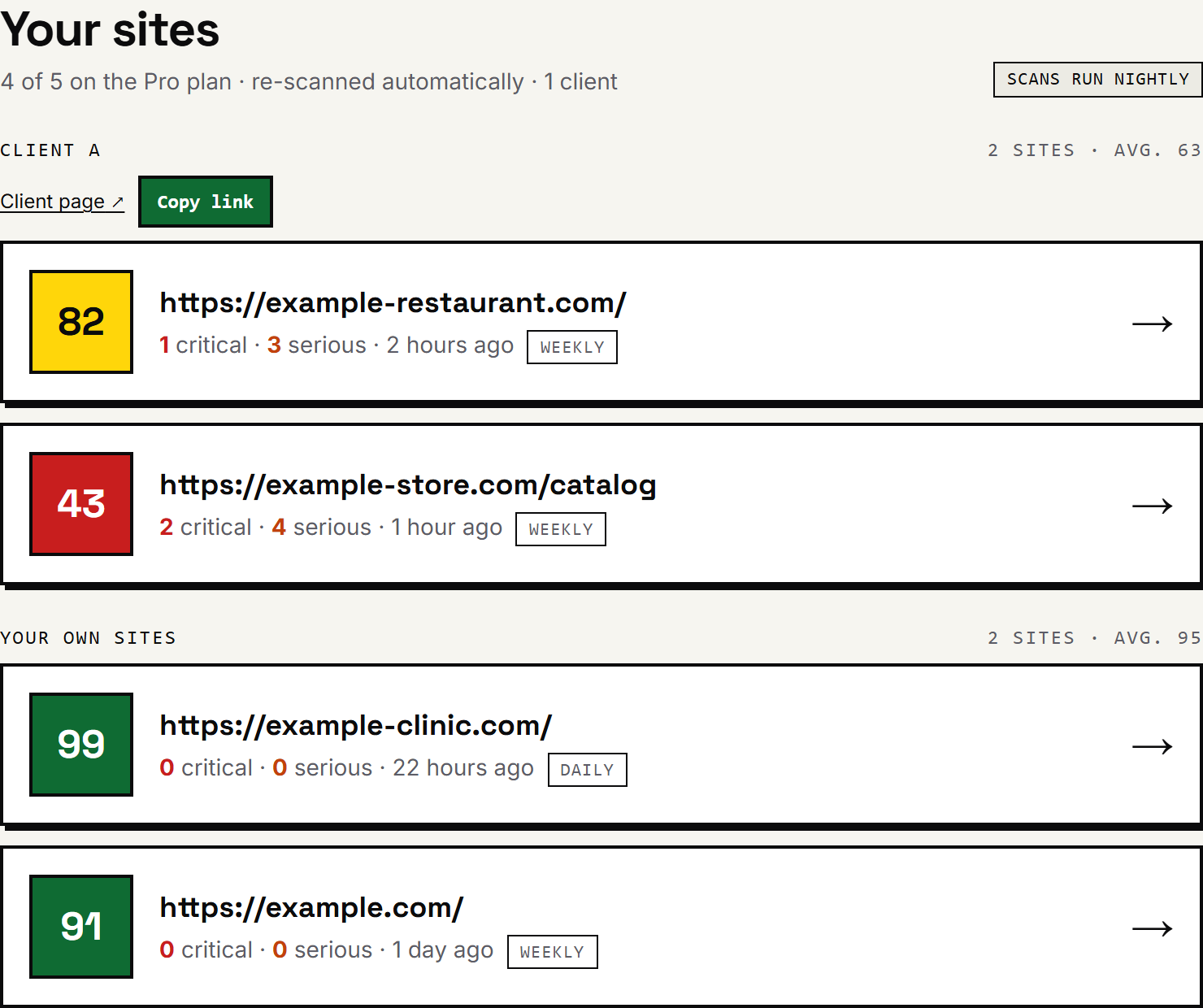
One dashboard, all your clients
Sites grouped by client with an average score per client. Add a site, tag the client, done.
The monthly email goes to them too
On the 1st, your client receives the same summary you do — with your brand, not ours — plus a public link that needs no account.
Deliverables you can resell
PDF in Spanish or English, a signed accessibility statement, a live badge, and the corrected code for their developer.
How it works
Three steps. No fix reaches your screen without passing the test that flagged it.
- 01
Scan
We run axe-core, the same engine as Chrome DevTools, on every page of the site, on desktop and on a phone viewport. Every finding maps to a WCAG criterion.
No AI. Just rules.
- 02
Fix
What rules can fix (contrast, language, titles), rules fix. For the rest (describing an image, naming a button) the AI sees the element and proposes one change, or says it doesn't know.
Never rewrites your page.
- 03
Test
Each fix is applied to a copy of your page and the same rule runs again. If it fails, it's dropped. If it passes, you copy it.
What you copy has already passed.
Monitoring, not a one-off PDF.
An audit tells you how you were doing on Tuesday. Monitoring tells you on Thursday, when someone uploaded three photos without a description.
Scheduled re-scans
Weekly or daily. Every change your team ships gets checked on its own.
Alerts that matter
One email when something breaks or your score drops. Silence when it doesn't.
Report in three languages
A summary for you, detail for your developer, a PDF for your lawyer. English, Spanish and Portuguese.
Start here
Which fixes raise your score the most, which already have code, which need a person.
Made for your platform
WordPress, Shopify, Wix, Squarespace, Webflow, Odoo. We tell you the exact menu where each thing is fixed; a developer is rarely needed.
Accessibility statement
A public page that updates itself with every scan. You link it from your footer.
A seal for your footer that updates itself
Paste one line in your site's footer and your visitors see your current score. Clicking it opens your public accessibility statement, refreshed after every scan. Proof you take care of it, and one less thing a lawyer can point at.
Not Lighthouse. Not a widget. Not an enterprise contract.
The four ways people deal with accessibility, tested on the same pages.
| What you get | Rampa | Lighthouse / PageSpeed | Overlay widgets | Enterprise scanners |
|---|---|---|---|---|
| Pages checked | Up to 100 per site, every week | One — the URL you type | None (it doesn't check) | Many |
| Phone and desktop | Both, on every page — fixes verified in the viewport where they failed | One or the other (PageSpeed: phone; DevTools: desktop) | — | Usually desktop |
| Fixes your code | Yes — corrected HTML, ready to paste | No — a link to documentation | No — a script patches the page in the visitor's browser | No — reports with references |
| Fixes tested before you see them | Yes | — | — | — |
| Explained for the owner | Yes, plus a developer view | No — audit names | — | Technical reports |
| The other half of WCAG (keyboard, zoom, captions…) | 7 one-minute tests with a pass criterion | Lists 10 "manual checks", no instructions | — | Sometimes, as a paid audit |
| Keeps watching after today | Yes — alerts, history, monthly summary | No — a snapshot | — | Yes |
| Score you can trust | Counts every element and its severity | 92 with 12 unreadable texts on the page | — | Varies |
| SEO | Not an SEO tool — but flags which fixes Google also reads (alt text, title, headings, links) | Separate audit, no fixes | — | — |
| English, Spanish and Portuguese | Yes — site, PDF, emails, statement | Yes (Chrome's language) | Partly | Rarely |
| Honest about limits | Yes — covers ~50% of criteria and the report says so | Yes | Claimed "automatic compliance" — FTC fined one vendor $1M in 2025 | Yes |
| Price | $9–$99 / month | Free | $49–$800 / month | $300–$1,000+ / month, plus onboarding |
Sources: Lighthouse 13.4 run on the same pages we scanned, September 2026 (same axe-core engine underneath; it gave 92 to a page with 12 low-contrast texts and 50 to one with 33 missing image descriptions); FTC final order against accessiBe (April 2025); public price lists, September 2026.
Simple pricing. Cancel anytime.
Prices in USD. Taxes handled by Paddle.
Try Starter free for 7 days — no card. Then pick a plan or keep the free tier (1 page a week).
Starter
One site.
$6.58/mo
billed $79 a year (you save $29)
- · 1 site · 10 pages each
- · Weekly re-scans
- · Executive PDF report
- · Tested fixes
Pro
Several sites, daily re-scans.
$20.75/mo
billed $249 a year (you save $99)
- · 5 sites · 25 pages each
- · Daily re-scans
- · Executive PDF report
- · History & alerts
Agency
Your clients, under your brand.
$74.92/mo
billed $899 a year (you save $289)
- · 20 sites · 50 pages each
- · Daily re-scans
- · Executive PDF report
- · White-label PDF
Automated testing covers roughly half of WCAG criteria; full conformance also requires manual review. Rampa provides technical information, not legal advice.
Straight answers
- Why can I be fined? What are WCAG and the ADA?
- Because the law says anyone with a disability must be able to use your site, and courts enforce it. WCAG is the list of rules those laws use to say what "usable" means. Each acronym is explained further up the page.
- What if Lighthouse gives me a better score than you?
- It usually will, and that's the point. Lighthouse counts rules, not elements: 12 unreadable texts on one page count as one failure, so it can say 92 while a dozen of your customers can't read the menu. We count each element and how serious it is, so our number is lower and closer to what a lawsuit would list. Both use the same engine (axe-core); the difference is that we check the whole site every week, hand you the corrected code and explain the manual checks. For page speed, keep using Lighthouse.
- I'm an agency. How does it work?
- Type the client's name when you add the site. The dashboard groups them, each client gets a page under your brand and receives the monthly summary from you on the 1st. PDF, statement and badge carry your brand on the Agency plan.
- Do you change anything on my site?
- No. We only read it. You copy the fixes and your developer applies them. If you want them live today, there is an optional one-line patch that does exactly that until the code is corrected.
- Why not an accessibility widget?
- A widget changes the page in the visitor's browser; your code stays broken. In 2025 the FTC fined one vendor $1 million for promising automatic compliance, and lawsuits keep naming sites that use them.
- I don't have a developer. What do I do with this?
- Forward the report with the "Send to my developer" button (or by WhatsApp) to your agency, your host or a freelancer. It has everything they need. And for Wix, Shopify or WordPress we tell you the menu where each thing is fixed.
- Is a 100 a legal guarantee?
- No. Automated tests cover about half of WCAG criteria. A 100 means you've cleared everything a machine can detect, which is most of what lawsuits cite.
- Can I try it before paying?
- Yes. The free scan needs no account, and the first site you add gets 7 days of Starter with no card.
- Who's behind this?
- An independent developer. Payments and invoices are handled by Paddle.com as Merchant of Record, so you get a proper invoice and a 14-day refund window.